Check QuickBooks sync
Who can do it
Owners.
A payment made with Stripe Link shows as "Stripe Link", including in QuickBooks. The customer's invoice link calls it "Link".
1. Check the invoice
Open the invoice's QuickBooks section. A successful sync records its result and time; a failed invoice or payment remains visible here and on the payment row.
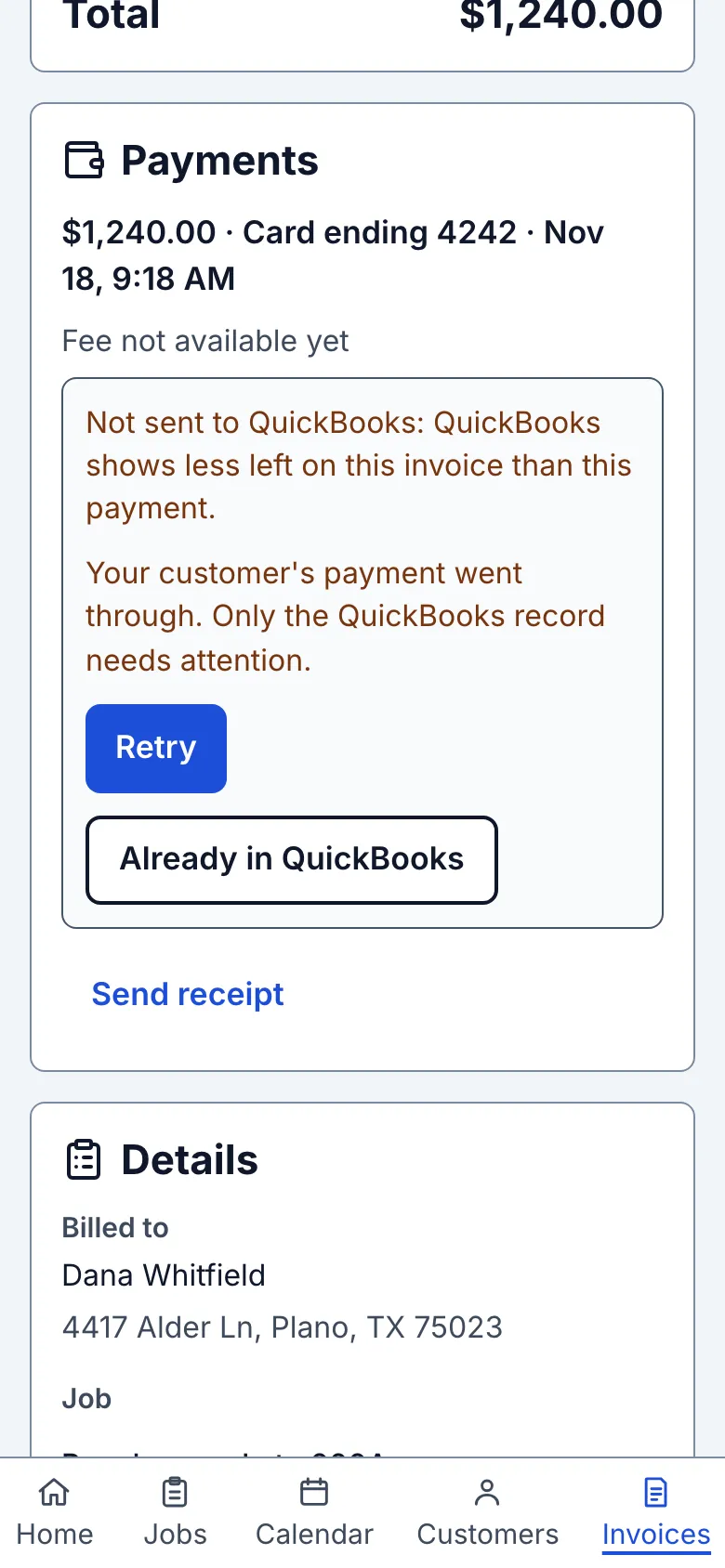
2. Retry a failed sync
For an online payment, read its reason and tap Retry. Your customer's payment went through; only the QuickBooks record needs attention. To close it after checking this particular payment in the books, tap Already in QuickBooks, read the warning and choose Mark as already there. Choose Keep trying to leave it open. Invoice and manual-payment failures still use Retry sync.
3. Send a closed payment again
On a payment marked as already there, tap Retry. Read the duplicate warning, then choose Send to QuickBooks only if this payment needs to be added. Choose Cancel to leave the books alone. A payment changed in QuickBooks asks before adding it again too.
4. Find other payments
Open Settings › QuickBooks Online. The QuickBooks payments card groups Not sent and Waiting payments and links each one to its invoice. Not sent includes payments Straightedge is checking; those have no action buttons. Waiting payments resume when their stated cause clears. Home links here when payments need attention or the connection needs reconnecting.
What you see after
A successful invoice shows Synced to QuickBooks with its time. Each local payment maps to one QuickBooks Payment record; Remove payment voids that record when possible.
Limits
QuickBooks Online only, one way from Straightedge. Changes made later to a customer in either system do not flow back. Two QuickBooks customers with the same name stop sync until one is renamed. A bank-deposited payment must be removed in QuickBooks, then checked here.
When it goes wrong
A failed invoice shows QuickBooks sync failed and Retry sync. An expired connection offers Reconnect. For a deposited payment, correct it in QuickBooks and use Check again on the invoice payment row.
- Does it work with QuickBooks Desktop? No. QuickBooks Online only, one way from Straightedge.
An old payment that has waited more than 30 days asks before sending. A missing time zone waits until you save one. A not-sent email arrives the next morning, with one reminder after seven days; after that the list and Home line remain. A read-only account waits until it becomes writable.
If the payment says “Waiting: this invoice isn't in QuickBooks yet. This payment is sent by itself once the invoice is.”, use Go to QuickBooks section on its invoice row. Tap Send to QuickBooks (or Retry sync) there. Settings Waiting also names these buttons; sending the invoice lets the payment follow by itself.
Notes for this job and Terms and warranty stay on the Straightedge document. They are not sent to QuickBooks or included in reminder emails; open the Straightedge invoice link to read them.
Still stuck? Email support@getstraightedge.com