Cancel a visit
Who can do it
Owners.
1. Open the review
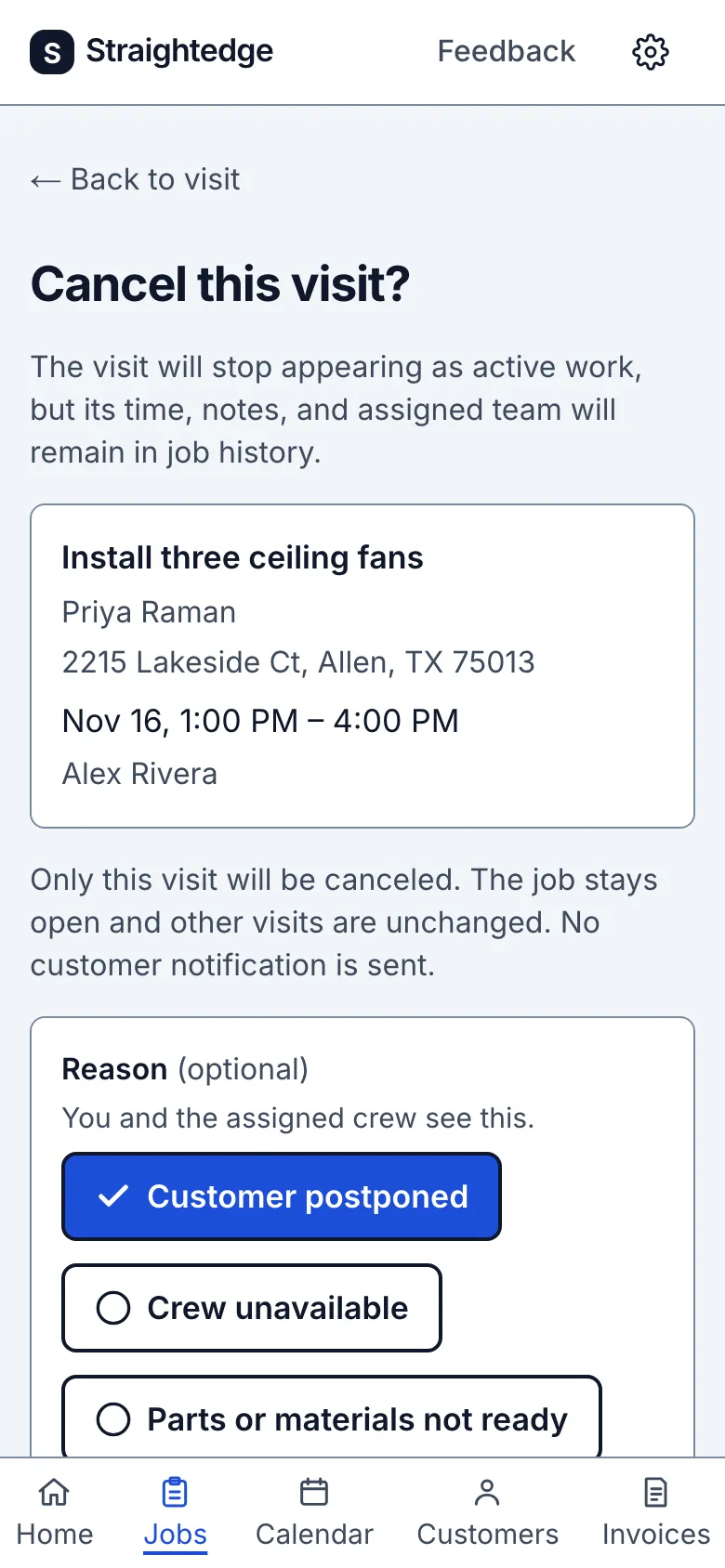
Open the visit and tap Cancel visit. A review page, "Cancel this visit?", shows the job, the customer and address, the time and who was going. Only this visit is canceled: the job stays open, its other visits are unchanged, and no customer notification is sent.
2. Pick a reason, or skip it
Under Reason, tap one: Customer postponed, Crew unavailable, Parts or materials not ready, Booked twice or Other…. Tap a chosen one again to clear it. Other… reveals an Other reason field for a line of your own. The reason is optional. You and the assigned crew see it on the visit afterwards.
3. Confirm
Tap Cancel visit. Keep visit goes back to the visit without changing anything.
What you see after
The visit shows as Canceled, with the reason under Cancellation on its page and in the job's visit list. Its time, notes and team stay in the job's history. It drops out of the calendar's active work and out of the crew's My visits.
If the customer was already emailed a reminder, the cancel review names the send day and offers to text the customer by first name. It opens the visit's Reminder draft in your phone's Messages app. Edit and send it there; Straightedge sends no cancellation email.
Canceling a scheduled visit from today on queues a crew visit email for its crew members whose emails are on.
When it goes wrong
- If saving fails, the page says "Visit not canceled" and keeps the reason you chose. Tap Cancel visit again, or Review updated details if the visit changed under you.
- Canceled by mistake? A canceled visit can't be put back. Schedule a new visit on the job.
Still stuck? Email support@getstraightedge.com