Give app access
Who can do it
Owners and full access partners. The account holder's access cannot be removed here.
1. Open access settings
In Settings, open Team and the person's member page. Tap Give app access.
2. Choose access
Enter the Email they will use to sign in. Choose Crew for assigned visits, notes and photos without prices or invoices, or Full access (partner) for the owner's business screens, including payments, QuickBooks, settings and team access.
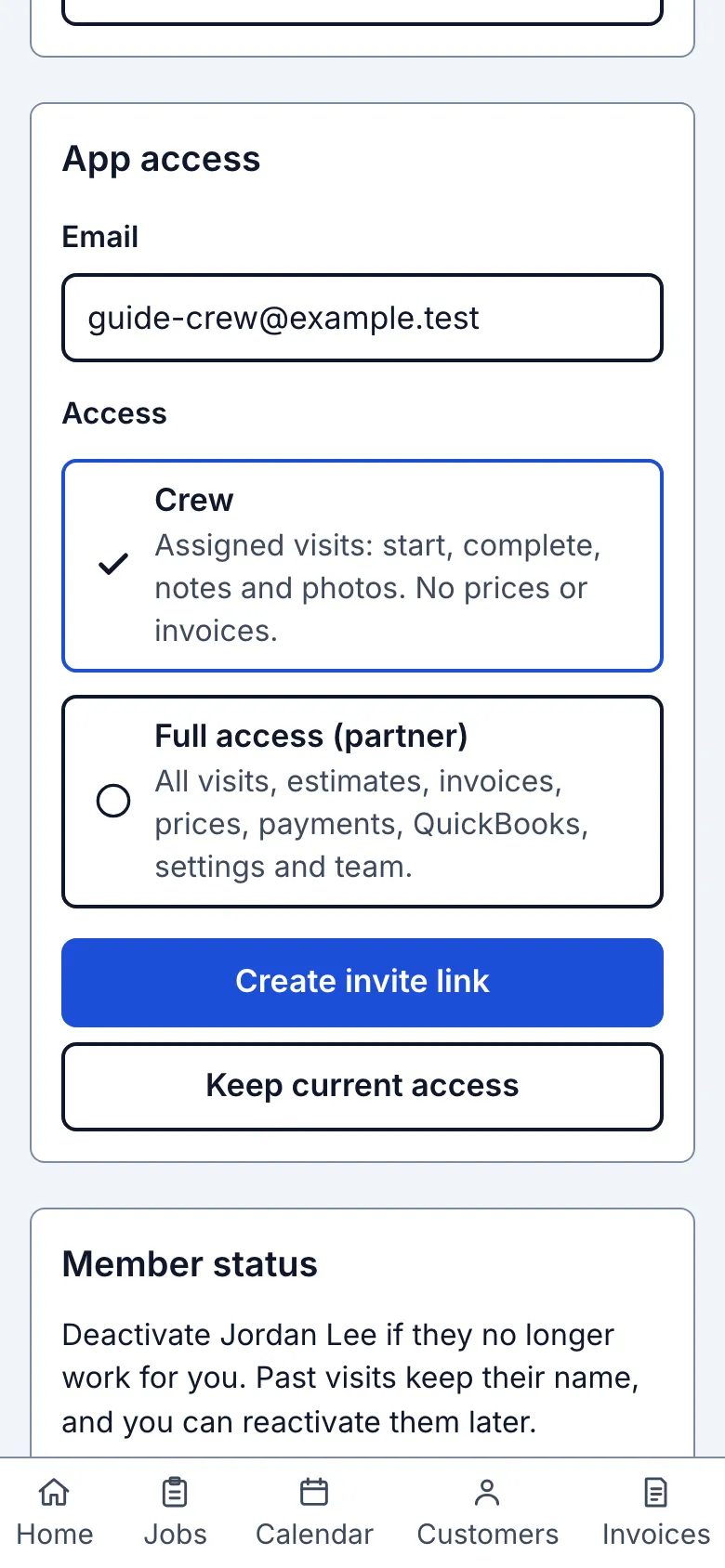
3. Create the link
Tap Create invite link. Share the link yourself; creating it does not send a message.
What you see after
The page says Invite link created. Share it with this person. and offers sharing controls. The member appears as Invited until they join.
Limits
- A crew member sees only assigned visits. A full access partner cannot remove the account holder or delete the business.
- Each link is tied to the entered email, works once and expires after seven days. See Send the invite.
When it goes wrong
- If the email is invalid, the form says Invite not created — 1 thing to fix. Correct the email and try again. If saving is not confirmed, check this member before creating another link.
Still stuck? Email support@getstraightedge.com